Resident First. Fiber First.
Home is where you relax, work, and connect with the people you love — your internet should simply carry that life, not interrupt it.
Why residents choose UplinkIQ
Ready the day you move in
Your internet comes with your lease and ends with it — no new contract, no application, no new devices. Connect on move-in day and you are online in minutes, and if you move to another unit in the community, your network moves with you.
Your own network, under your control
Every resident has a private network of their own, with its own name and password, and you control it — your devices and your traffic stay yours.
Our fiber is faster
Light through glass: fast in both directions, and steady when the whole building gets home in the evening.
More than a speed number
A speed figure only says how wide the road is. What makes the internet feel instant is fewer hops, less sharing and lower latency — so that is what we build for.
Fewer hops, less sharing
Your building connects over its own fiber, and your home has its own lane on it — fewer networks between you and what you use, and no sharing with the whole neighborhood.
Connected straight to what you use
We peer directly with the streaming, cloud and game networks residents use most, so that traffic takes the short road instead of crossing the public internet.
Lower latency, instant where it counts
A video call that never talks over itself, a game that never stutters, a movie that never pauses to buffer.
Always monitored
Our operations team finds faults before you notice them, and when hands are needed a technician is dispatched the same business day for a building-wide issue and by the next business day for a single home.
In your hands
Speed tests, your devices, your tickets and your plan, all in the Resident Portal — no front desk.
Security by design
WPA3 encryption and per-unit isolation come standard, with intrusion detection behind them.
One network for the whole building
The same managed converged network also carries the cameras, access control and IoT, each on its own segment — one team looks after all of it.
Bundles depend on your property
Some communities include internet in the rent and others add services as a bundle. Your move-in packet and your leasing office say what your building offers.
Why latency matters more than speed
Speed is how much can arrive at once — the width of the road.
Latency is how long each request takes to get there and back — the length of the trip.
Calls, games, smart-home devices and everyday clicking send a stream of small requests, so the wait matters more than the width.
Fiber keeps the trip short, so everything feels instant.
Troubleshooting help
Where do I plug in my router?
Your router arrives ready to go. Check each connection in the order shown, from the wall jack to your own devices, and you are online in minutes — no appointment and no technician visit.
- Wall to adapter: a blue Ethernet cable runs from the UplinkIQ Ethernet wall jack to the POE splitter.
- Adapter to router: the splitter's network cable must go into the blue port on the router, and its power cable into the router's power port.
- Check router lights: make sure the power and internet lights are on.
- Personal devices: internet only works with our device; plug your own devices into the yellow LAN ports.
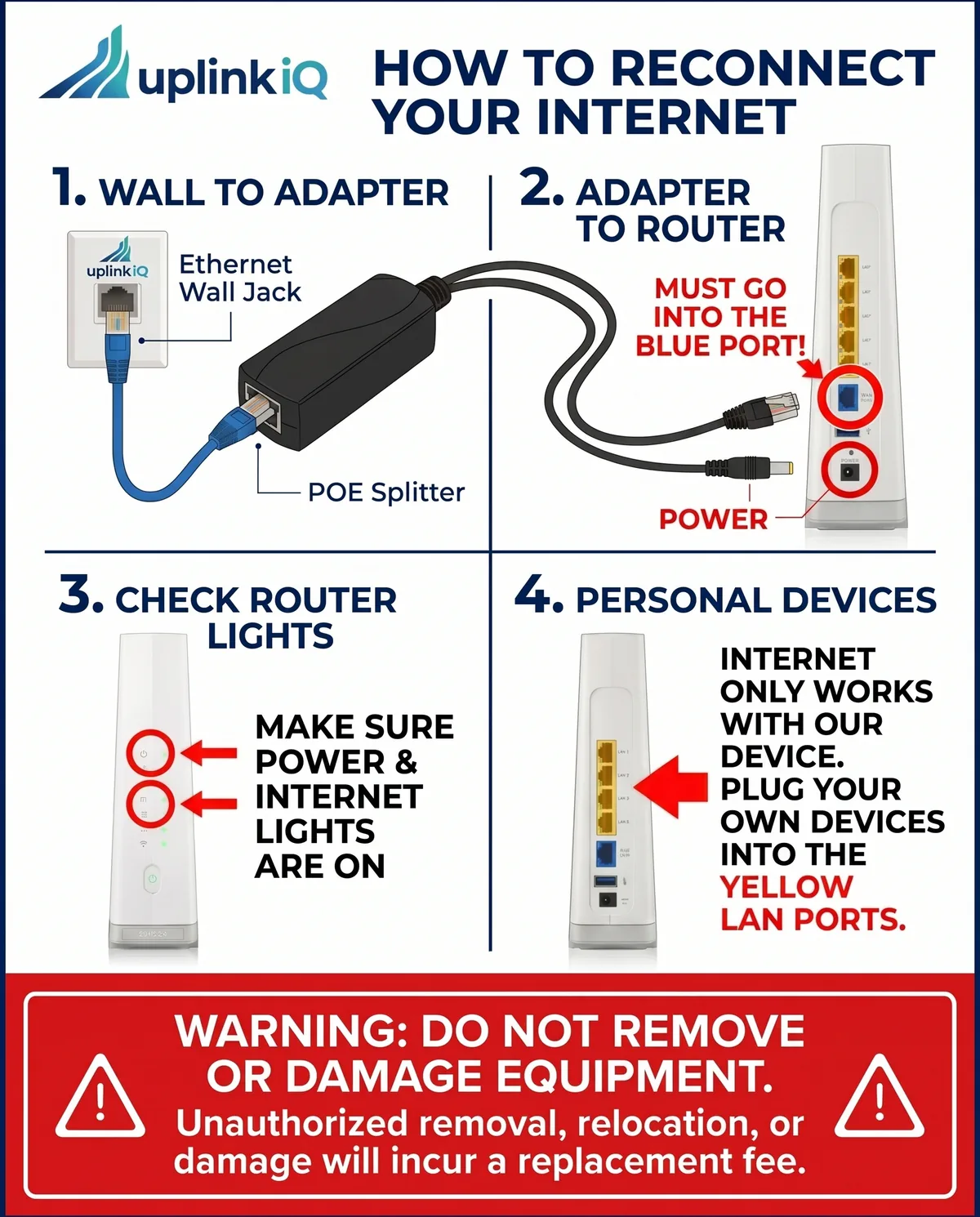
The wall plate with the UplinkIQ logo is ONLY for UplinkIQ-approved devices. Plugging in personal devices will disable the port.
How do I connect to the property Wi-Fi?
Look for your property Wi-Fi network name (SSID) on your device. The network name and password are provided in your move-in packet or available from your leasing office. Once connected, you may need to accept terms of service through a quick captive portal page.
My internet is slow. What should I try first?
Start with these steps: (1) Restart your device, (2) Move closer to the nearest access point — walls and large furniture can reduce signal strength, (3) Disconnect devices you are not actively using, (4) Run a speed test at the resident portal to check your actual speeds. If the issue persists, contact our support team and we can diagnose remotely.
Can I upgrade my internet speed?
Speed tier upgrades are available at most UplinkIQ-managed properties. Log into your resident portal or contact our support team to see available plans and pricing for your community.
Who handles my billing — UplinkIQ or my property?
This varies by property. Some communities include internet in rent, others bill separately through UplinkIQ or through your property management company. Check your lease agreement or ask your leasing office for details on your specific billing arrangement.
What is low-latency internet, and why does it matter for me?
Latency is the time data takes to make a round trip between your device and the internet — the lower it is, the more instant everything feels. Low latency is what keeps a video call from talking over itself, a game from stuttering at the worst moment, and a movie from pausing to buffer. It matters most for the things you do live: calls, gaming, smart-home devices, and working from home.
Support Channels
Multiple ways to get help — choose what works best for you.
Ticketing, chat and technician visits are opened from the Resident Portal. Cannot sign in right now? Send us a request below instead.
Ticketing & Chat
Reach a real technician through ticketing or chat — no phone trees to get through. Our support team answers live from 9am-5pm, and automated help in the resident portal never closes, so you can start a fix or hand us the details whenever something comes up.
Sign in to the Resident PortalEmail Support
Send detailed issues to our support team at support@uplinkiq.com. We respond to all emails within 4 business hours with a ticket number for tracking.
Email support@uplinkiq.comResident Portal
Self-service troubleshooting, speed tests, device management, and support ticket submission — all from your browser. Available 24/7 with step-by-step guided diagnostics.
Open the Resident PortalOn-Site Technicians
When remote troubleshooting is not enough, we dispatch a certified technician to your property. Same-business-day dispatch for a building-wide issue and by the next business day for a single home, with scheduled appointments for non-urgent requests.
Request a visit in the Resident Portal
Send us a support request
Tell us what is happening and we will reply by email.
Already a subscriber? Residents, sign in to the Resident Portal; property staff, sign in to the Property Manager Portal. For anything else, send us a request below.
A request becomes a support ticket when you choose Customer support and give the service address and the email address registered with us — we reply to that address.